
Outline
Introduction to Linkedin Targeting – Why Linkedin Targeting?, Audience Targeting Driven by Member Profiles, Match Your Targeting to Your Marketing Objectives, Knowledge Check.
How Linkedin Targeting Works – Two ways to target on Linkedin, When to use AND-OR Targeting, How to target by Audience Attributes, Knowledge Check.
Matched Audiences – How to create Linkedin matched audiences, Retargeting, Contact Targeting, Company Targeting, Audience Expansion, Knowledge Check
Optimizing your Targeting Strategy – Data Integrations with Linkedin Marketing Partners, View your Forecasted Results, Targeting best practices, Knowledge Check
About this Article:
This article will demonstrate how to use Linkedin’s powerful targeting attributes to define and reach business’ desired customers.
Explore Linkedin’s unique targeting and the important steps, best practices to tailor ad targeting strategy to the Linkedin campaign objectives.
What you’ll learn
After this article, you will be able to:
- Create target audiences using Linkedin’s first-party member data audience attributes.
- Combine business data with Linkedin’s data to create a matched audience.
- Explore the different campaign strategies you can employ with matched audiences.
- Refine targeting using AND-OR logic to broaden or narrow the audience.
- Optimize ad targeting strategy.
This article is for you if:
- You’re new to developing a targeting strategy.
- You’re interested in additional ways to target audiences.
- You want to optimize your existing ad campaigns.
Topics covered
Audience attributes, audience expansion, campaign manager, company targeting, contact targeting, forecasted results, matched audiences, retargeting, targeting.
Disclaimer: This article is inspired from Linkedin marketing academy
Why Linkedin Targeting?
Targeting is one of the most important parts of a successful advertising campaign.
When you target the right audience, you get better engagement, higher quality leads, and a stronger ROI (Return on Investment)
Linkedin stands out because it lets you target a high-quality professional audience in a professional environment.
Quality Audience
Linkedin members keep their profiles accurate and up to date for networking, personal branding, and career opportunities.
This gives advertisers access to realiable, member-provided professional data for precise targeting.
Linkedin has over 900 million professionals across 200+ countries.
It includes 58+ million companies, business decision-makers, 120,000 schools and 38,000 skills.
This broad professional network helps advertisers reach the entire buying committee involved in business decisions.
Professional Context of Linkedin
People use Linkedin with a professional mindset, unlike many other social media platforms.
Members visit Linkedin to grow their careers, build professional relationships, and stay informed.
They actively:
Share and consume professional content
Celebrate career milestones
Post work-related updates
List their job experience, skills, interests and achievements.
This rich professional information helps the advertisers identify and reach their ideal customer profile (ICP)
Industry Perspective
Kelly Cheng, Senior Marketing Specialist at PagerDuty, highlights that Linkedin’s targeting capabilities are unique because they combine accurate professional data with a business-focused environment, making it easier to reach the right audience.
Audience Targeting Driven by Member Profiles
Linkedin’s targeting is powered by the high-quality information that members give and regularly update in their profiles.
This helps advertisers reach the right professional audience with greater accuracy.
Member-Provided Profile Data
Linkedin’s targeting capabilities are based on the detailed information members add to their profiles.
Members regularly update their profiles for career growth, networking, and job opportunities.
This ensures advertisers can target audiences using reliable and current professional data.
Member-Provided vs. Inferred Data
Most Linkedin targeting attributes come directly from information that members provide or from their activity on the platform.
This means advertisers primarly use data that members have voluntarily shared and kept up to date.
Demographic Targeting
- Linkedin also offers demographic attributes like age and gender.
- These attributes are inferred from a member’s profile rather than directly provided.
- They can only be used for equal opportunity advertising.
- They cannot be used to discriminate based on age, gender, or other protected characteristics in advertisements related to employment, housing, education or credit.
Best Practice
- For most campaigns, Linkedin recommends using professional targeting attributes instead of age or gender.
- These include interests, member traits, skills and job functions.
- Professional targeting typically delivers stronger campaign performance and better results.
Match Targeting to Marketing Objectives
All the campaigns should be built around the marketing objective: awareness, consideration and conversion.
Awareness includes Job function + Seniority, Skills or Job Titles, Interest Targeting.
Consideration includes Job Titles + Member Traits, Uploaded Lists, Website Retargeting and Retargeting by Engagement.
Conversion includes uploaded lists, website retargeing and retargeting by engagement.
The minimum target audience size that Linkedin will allow is 300 members, but consider 50,000 as a minimum rule of thumb for success.
That gives enough information to find out who’s engaging with the ads.
Let’s Check if we know something
- Which of the following types of data is inferred on Linkedin?
- Gender
Company Industry- Age
Job Title
- What are the key aspects of the Linkedin audience?
- Members are incentivized to keep their profile accurate.
Linkedin infers all of its data based on member behavior.- Linkedin has the largest global community of professionals.
- Members engage with Linkedin in a professional context.
- What is the minimum audience size?
- 5,000
- 50,000
- 300
- 3,000
- You can only use Job Titles to target with Conversion objectives.
True- False
2 ways to target on Linkedin
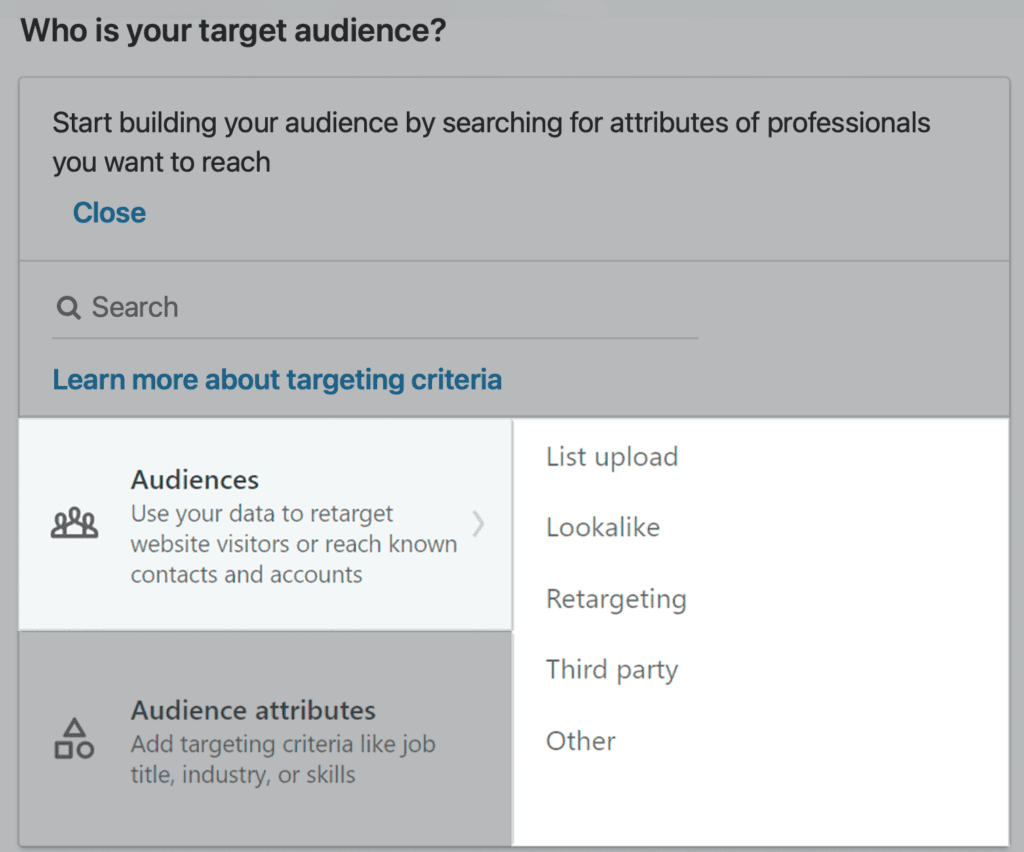
When it comes to targeting on Linkedin, there are 2 methods to use: Audience attributes and Matched Audiences.
Audience Attributes: Target the audience by information either directly input or inferred from Linkedin member profiles.
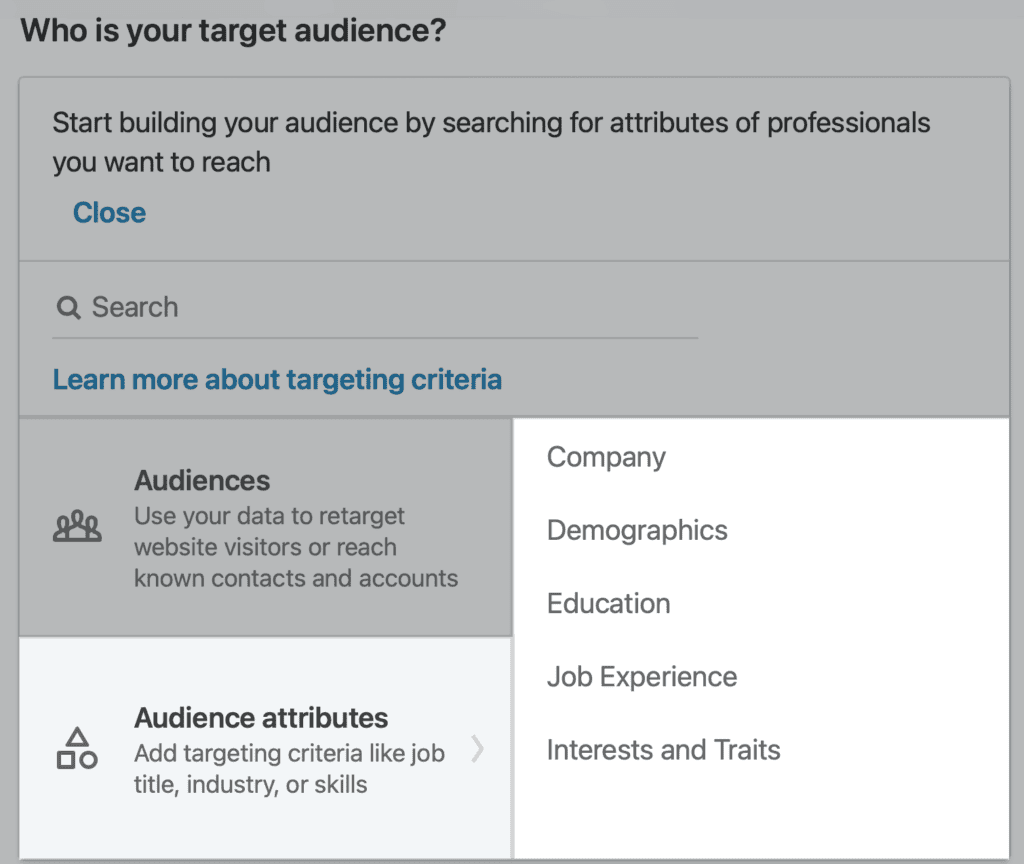
Matched Audiences (Audiences) is the suite of targeting features that empowers an advertiser to reach an audience of members you already know by combining Linkedin’s powerful professional data with your own data.
For example, you can upload a list of companies or contacts, target people who visited your website, or import third-party data from a Linkedin Marketing Partner through easy-to-use integrations.
When to Use AND-OR Targeting
Using a combination of “AND” or “OR” can help you reach the right professionals even more efficiently.
To narrow and further refine your targeting criteria use “AND” to increase your audience to include members who meet one criterion or another use “OR”
Let’s see how using AND-OR targeting would impact the audience size.
Target using ‘OR’
- Select the targeting criteria
- Select the home icon to add additional criteria, this will ‘or’ any futher selections.
Targeting using ‘and’:
- Select targeting criteria.
- Select ‘Narrow audience further‘. It will open up a new panel which will say’And also have ANY of the following attributes’. Any selections made in this panel will ‘and’ with selections made in step 1.
Idea: Targeting by ‘AND’ or ‘OR’ works with any professional attributes and matched audiences.
How to Target by Audience Attributes
There are 3 scenarios when targeting by audience attributes
Scenario 1. Targeting by Company Attributes
Scenario 2: Job Experience + Skills and Interest targeting
Scenario 3: Targeting by Years of Experience
An advertiser can also exclude by targeting attributes.
When you’re targeting by job title, you cannot exclude job function or seniority.
It’s another way of mixing and combining specific traits to make sure that you are reaching exactly the right audience.
To familiarize with detailed descriptions of each available attribute, click here.
Let’s see what we know now!
Q 1: When would you use OR as a targeting logic?
When you want your audience to meet at least one of the selected attributes.
When you want your audience to meet all the selected attributes.
Q 2: What are the 2 main ways to build a target audience on Linkedin?
Use your own data like contact lists, CRM data or website visitors to create an audience.
Use keywords found in member profiles and posts.
Use Linkedin audience attributes.
Use Linkedin’s random audience generator tool.
Q 3, Targeting by ‘AND’ or ‘OR’ works with any audience attributes and matched audience.
TrueFalse
Matched Audiences
How to Create Linkedin Matched Audiences
Matched Audiences is a Linkedin targeting feature that helps the Advertisers reach the right people using the existing customer and audience data.
An Advertiser can use it to:
- Retarget people who visited your website.
- Reach people who interacted with your Video Ads or Lead Gen Forms.
- Market to contracts from your customer database or marketing automation platform.
- Target decision-makers at specific companies for Account-Based Marketing (ABM) campaigns.
Many advertisers have reduced their cost per lead (CPL) by up to 14% using Matched Audiences.
4 Ways to Use Matched Audiences
- Website Retargeting
- Show ads to people who visited important pages on the website, like pricing or product pages.
- This helps keep them engaged and move them further through the buying journey.
- You must install the Linkedin Insight Tag before using Website Retargeting.
- Data Integrations
- Linkedin works with many marketing partners.
- These integrations make it easy to import your customer and audience data into Linkedin.
- Contact Targeting
- Upload a CSV file containing email addresses from your customer database or marketing automation platform.
- Reach contacts who haven’t engaged with your business in the last 18 months.
- You can also upload your existing customer list to exclude them from lead generation campaigns.
- Company Targeting
- Target specific companies that your sales team wants to reach.
- Send personalized Sponsored Messages, such as from a company executive.
- You can also target your existing customers when it’s time for contract or subscription renewal.
Retargeting
Effective retargeint uses visitors’ actions to move them closer to making a purchase.
Linkedin’s retargeting features help shorten the buying journey by showing personalized content based on previous interactions, like visiting your website, watching a video or oepning a Lead Gen Form.
Website Retargeting
Website Retargeting lets you create audiences based on the pages people visited on your website.
You can then re-engage them with content related to those pages.
To use Website Retargeting, you must install the Linkedin Insight Tag in the global footer of your website.
Retarget with Personalized Content
Segment visitors based on the pages they viewed and show them relevant in-feed ads based on their interests.
This helps guide prospects through the buying journey and generate more qualified leads and sales.
Example: Somone who visited your product page can later see a customer case study highlighting success with that product.
Retarget with Dynamic Sponsored Messages
You can also re-engage visitors who viewed bottom-of-the-funnel pages like Pricing, or Demo pages, by sending them a personalized sponsored message when they visit Linkedin.
Example: Show visitors to your pricing page a Message Ad offering a 30-day free trial.
Important Requirements
- The Linkedin Insight Tag must be installed to use Website Retargeting.
- For conversion tracking, your setup must allow the use of first-party cookies.
Retargeting Based on Ad Engagement
You can also retarget people who have already interacted with your brand on Linkedin.
Lead Gen Form Retargeting
Re-engage people who opened or submitted a Lead Gen Form to improve your chances of conversion.
Video Retargeting
Reach people who watched part of your video ads and keep your brand top of mind.
Single Image Ad Retargeting
Retarget members who engaged with your Single Image Ads to keep your brand in consideration.
Document Ad Retargeting
Retarget members who engaged with your Document Ads to continue nurturing their interest.
Linkedin Event Retargeting
Create audiences of members who chose to attend your Linkedin events.
You can include attendees from both upcoming and past events hosted on your Linkedin Page.
Company Page Retargeting
Create audiences based on members who:
Viewed your Linkedin Company Page, or
Clicked a call-to-action (CTA) button in your Page header.
You can also choose how recently members viewed or interacted with your Page.
When creating this audience, Linkedin shows how many members recently viewed your Page or clicked its CTA button.
Retargeting Best Practices
- Personalize ads based on what visitors viewed or the actions they took. For example, remind people about a product they viewed on your website or in a Video Ad.
- Compare audience performance, like blog visitors versus lead page visitors, to understand whi,ch content drives better results
- Use different ad formats that match where prospects are in the buying journey.
- Avoid adding extra targeting layers, as this can unnecessarily limit your retargeting audience.
Important Link: Enable first-party cookies on a Linkedin Insight Tag
Contact Targeting
Contact Targeting lets you upload or connect your email contact lists to target those people on Linkedin.
You can also combine your contact list with Linkedin’s audience targeting options to reach the most relevant people.
Examples:
- Upload the existing customer list to promote a new service only to them.
- Exclude the current customers from a campaign meant to find new customers.
What can you do with Contact Targeting?
Build a custom audience
- Upload the email contact list securely or connect your contact management platform.
- Reach prospects and people you already know.
Deliver relevant content
Show personalized ads based on where people are in the customer journey.
Convert prospects, retain existing customers, and win back churned customers.
Increase conversions
- Move contacts through the buying journey.
- Generate more qualified leads and sales
Contact list requirements
- You can upload up to 300,000 contacts.
- Supported data includes email address, first name, last name and mobile ID.
- Lists usually take about 48 hours to process.
Contact Targeting Best Practices
- Avoid hyper-targeting
- Use at least 10,000 email contacts for a better match rate and audience size.
- Don’t add too many extra targeting filters – 2 additional filters maximum is recommended.
- Audience size can vary by region.
- Use the CSV template.
- Download and use the CSV template from Campaign Manager.
- It helps ensure your file is formatted correctly for upload.
- Check spelling and formatting
- Make sure all contact information is accurate.,
- Remove unnecessary formatting, such as quotation marks around email addresses, to improve match rates.
- Keep ads relevant
- Show ads that match each lead’s stage in the sales funnel.
- Segment your contacts
- Create separate audiences such as:
- Prospects
- Current customers
- Churned customers
- Prospects who never open your emails.
- Create separate audiences such as:
This allows you to send more relevant messages to each group.
6. Exclude existing customers
- Don’t show prospecting ads to your current customers.
- When setting up the audience, change the option from Include to Exclude.
7. Wait for processing
- If your audience doesn’t appear immediately, remmeber that uploaded lists take up to 48 hours to process.
8. Consider company targeting
- business email addresses may not always match Linkedin accounts because many members sign up with their personal email addresses.
- If match rates are low, target the company instead of individual contacts.
- You can still add Linkedin targeting filters to reach the right people within those companies.
Company Targeting
Company Targeting lets you run account-based marketing (ABM) campaigns by matching your target companies with 5B+ million Linkedin Pages.
You can then combine these companies with Linkedin’s professional targeting to reach the right decision-makers, generate qualified leads, and drive sales.
You can target or exclude specific companies from your campaigns.
Example
Target companies your sales team has identified as high-potential prospects.
Exclude companies you don’t want to advertise to.
After selecting your company list, combine it with Linkedin’s professional targeting (such as Job Title or Job Seniority) to deliver personalized ads.
For example:
Send a personalized Message Ad from a company executive to decision-makers at your target companies.
Target your existing customers with renewal campaigns.
You can also upload a company list (CSV) to use Company Targeting.
5 Best Practices for Company Targeting
- Combine your company list with professional targeting (such as Job Title or Job Seniority) to reach people who make or influence purchasing decisions.
- Avoid adding too many targeting attributes, as this can create hyper-targeting and reduce campaign delivery.
- Keep your audience size above 50,000 members. Campaign manager provides an estimated audience size. (Audience sizes may vary by region.)
- Upload a CSV containing at least 1,000 companies to help your campaign achieve sufficent scale and delivery.
- Segment your company list using filters like Company Industry or Company Size for more relevant targeting.
Supported Company Matching Fields
Download the CSV template from Campaign Manager and match companies using one or more of the following:
- Company Name
- Company Website
- Company Email Domain
- Linkedin Company Page URL
- Stock Symbol
- Industry
- City
- State
- Country
- Zip/Postal Code
Using multiple matching fields can improve the accuracy of company matching.
Important Link : Company Targeting Tips
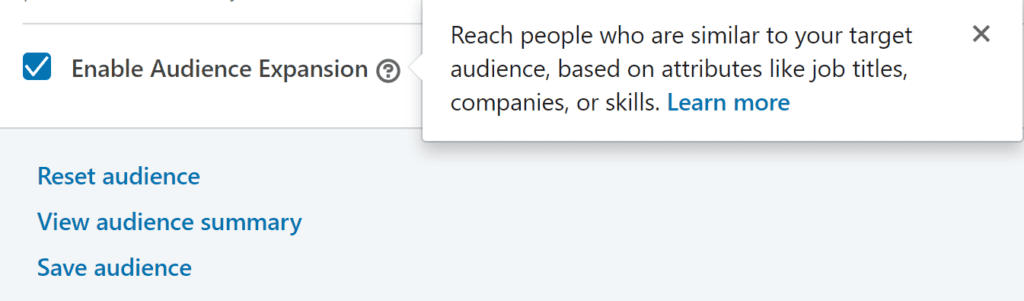
Audience Expansion
Audience Expansion is created from audience attributes targeting.
It allows to reach more people with similar professional characteristics.
It always includes the seed audience, and you can control the expansion model by exluding criteria.
Audience Expansion is checked by default when creating campaigns.
Consider using when:
- Looking to expand campaign reach.
- Looking to scale a campaign for awareness and consideration goal types.
Let’s check the knowledge
Q 1. Which of the following is not a Matched Audience option?
Linkedin Audience Network.Website Retargeting.
Company Targeting
Q 2: What can you do with Website Retargeting?
Target people who shared one of your Linkedin AdsTarget visitors who left your website without purchasing.
Target visitors that engaged with a product on your website.Exclude specific customers or companies from your campaign.
Question 3: When using company targeting, how many companies does Linkedin recommend as a minimum?
50
500
1000
Data Integrations with Linkedin Marketing Partners
If you want to get more from the Linkedin ads, you can always connect the marketing automation, CRM, or other data platforms to improve your targeting.
Linkedin works with many Marketing Partners that offer easy-to-use integrations, including marketing automation partners, CRMs, and data connector providers.
These integrations helpl you:
- Save time by automating data syncing.
- Keep your targeting lists up to date.
- Bring external data into Linkedin for targeting.
You can import 4 things:
- Customer contact lists.
- Company target lists (for account-based marketing).
- Behavioral audience segments.
- Other relevant audience data.
Like all Linkedin targeting, you can combine these importaed lists with Linkedin’s audience attributes – such as seniority, skills, job function, and more – to reach the most relevant people.
Onboard your own data to Linkedin
Use Marketing Partners like Salesforce, Marketo, Eloqua, Zapier, Hubspot and LiveRamp.
Onboard Partner data to Linkedin
Use Marketing Partners like LiveRamp, Bombora, G2, HG Inights, Acxiom.
Important Link: Connect a marketing partner with Campaign Manager for Matched Audiences
View Your Forecasted Results
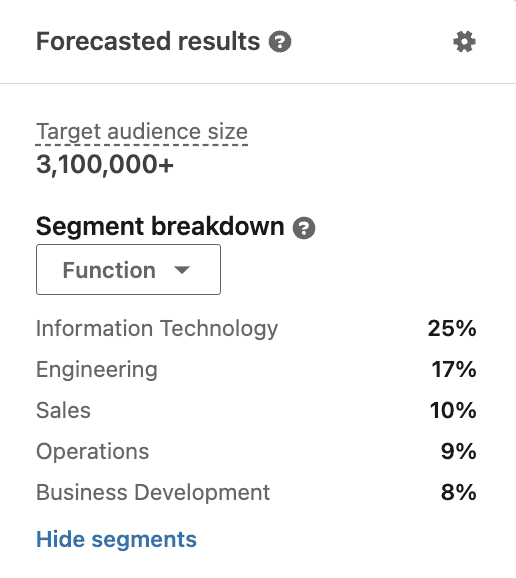
While building your target audience, keep an eye on the forecasted results panel on the right side of Campaign Manager.
It helps you understand who you’re targeting and how your budget is expected to perform.
How Forecasted Results are calculated
Linkedin estimates your campaign performance by analyzing your bid, budget, targeting, campaign start and end dates and other campaign settings.
It also considers similar campaigns and advertisers, then simulates the ad auction to generate the forecast.
Target audience size
Shows the number of Linkedin members who match your targeting criteria.
Segment breakdown
Use filters to understand the professional makeup of your audience.
This data comes from members’ standardized Linkedin profile information.
Available breakdowns include- function, seniority, years of experience, company size, industry, interests.
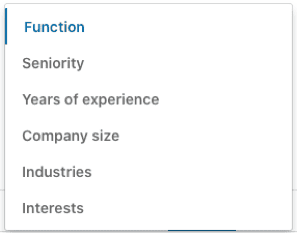
For example, Campaign Manager may show a target audience of 3+ million members, depending on the selected segment.
Daily, weekly, and monthly forecasts
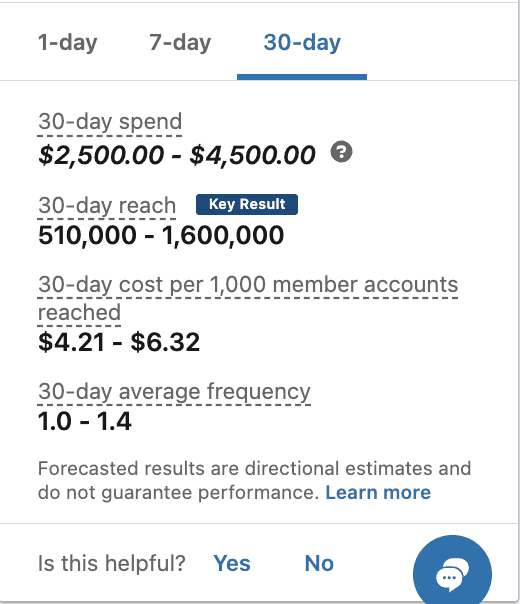
These forecasts help estimate whether target audience is likely to deliver desired campaign results or not.
Spend : Shows the projected amount a campaign is expected to spend. To improve the forecast, adjust: Bid, Daily budget, and total budget.
Impressions : Shows the estimated number of times ad will be displayed.
To change this estimate, adjust: bid, daily budget, total budget and targeting.
CTR (Click-Through Rate)
Shows the percentage of chargeable clicks compared to the number of impressions served.
CTR = Chargeable Clicks/Impressions
Clicks : Shows the estimated number of chargeable clicks your ad is expected to receive.
To change this estimate, adjust bid, daily budget, total budget and target.
Campaign manager can also display a 30-day forecast showing estimated spend, impressions, CTR, and clicks.
Note: Some Linkedin campaign products are not yet included in Forecasted Results.
If your campaign uses an unsupported feature i.e. products that are not yet incorporated in forecasted results, Campaign Manager will display a disclaimer at the bottom of the Forecasted Results panel explaining which selections are not supported during the campaign creation process.
4 Best Practices for Linkedin Targeting
- Set a Winning Strategy
- Start broad, then optimize. Launch with a broad audience and narrow it based on campaign performance.
- Use Linkedin’s aggregated demographic reports to see who is clicking and converting, filtered by attributes like job title, job function, seniority, and more.
- Use large enough audience. Start with broader audiences so you can collect statistically significant data for optimization. Linkedin recommends minimum audience size of 50,000.
- Match targeting to the marketing funnel. Begin with upper-funnel campaigns to learn which audiences perform best. Use those insights to create more focused campaigns further down the funnel.
- Adjust bidding and messaging for niche audiences. Ue the right bidding strategy – Cost Per Click (CPC), Cost Per 1000 Impressions (CPM), or Cost Per View (CPV) – and tailor your messaging for smaller, more specific audiences.
- Use exlusions strategically. Sometimes it’s more effective to exclude irrelevant audiences than to keep adding inclusion criteria.
- Tailor content to audience.
Your messaging should match the audience you’re targeting. If campaign isn’t delivering the expected results, review your content and make sure it’s relevant to each audience segment.
Example: A B2B marketing company launches a new research report and wants people to download it.
Instead of showing the same message to everyone, they create different messages for different audiences:
- Chief Marketing Officers (CMOs): These insights can help you dri,ve transformational change to your business.
- Marketing Directors: Need to demonstrate the ROI of your marketing effoects? These insights can help.
- Social Media Managers: “Social media managers: Get the insights you need to drive the engagement you want”
The offer stays the same, but the message is customized to each audience’s goals and responsibilities.
Save and Reuse High-Performing Audiences
If you have just started Linkedin ads, start with Linkedin Audience Templates. These templates help you quickly target common audiences like event planners, doctors, recent college graduates, millennials and many others.
This removes the need to manually combine multiple targeting options.
Once you’ve created an effective audience, use Save as template. This lets you reuse the audience in future campaigns, saving setup time while consistently reaching the right people.
Think Global, Act Local
For global campaigns, divide your audience by region. This helps improve daily budget pacing and prevents one region from consuming most of your impressions, clicks, or budget.
If you’re targeting a language with a small audience consider removing some targeting restrictions to expand your reach or running a seperate campaign in english for the relevant geographic locations, allowing you to reach bilingual professionals who speak both English and the target language.
Let’s see how much we know now
- What is the minimum recommended audience for a winning campaign?
10,00050,000100,000 - Which of the following actions is likely to narrow your audience down?
Exclude an audience attributeUse OR instead of AND.Enable Linkedin Audience Network. - What is a key tactic to understand how audiences engage with the ads?
Target the buying committeeRun multiple campaigns at a time to test different target audiences.
Save and reuse your winning audiences
Use Matched Audiences as the main targeting method - Linkedin Marketing Partners can help you…
Save time
keep yout targeting lists updated.
Share contact, company or customer lists with your Campaign Manager account. - The Forecasted Results tool can only show you a monthly estimated forecast.
TrueFalse