
Learn to create an ad campaign, measure success, and optimize for your advertising objectives.
Guide Outline
- Why Advertise on Linkedin? : Why do marketers love Linkedin?
- Getting Started : How to set up your Linkedin Page, Boosting from your Linkedin Page, Planning Your Advertising Campaign Strategy, How to get started with Campaign Manager, Knowledge Check
- Creating Your 1st Ad Campaign : Choose an Objective, Choose the Right Audience, Choose Your Ad Format, Set Budget, Schedule and Bid, Create Ads, Launch and Optimize, Knowledge Check
- Reporting : Campaign Manager Reporting with Knowledge Check
Why Do Internet Marketers Love Linkedin?
To understand how best to advertise on Linkedin, It’s important to start with why.
In this section, we will introduce the Linkedin audience and environment and the reasons why marketers make Linkedin a part of their advertising strategy.
Linkedin is home to the largest global community of professionals, from senior-level influencers to individual contributors.
What’s more, people come to Linkedin to invest time, not waste it.
They’re here to learn, advance their careers, and connect with peers.
It’s a platform ideally suited for marketers to connect with B2B and B2C buyers making relatively high-consideration decisions and purchases.
Right Environment : Home to world’s largest professional network with over 900 million members in over 200 countries.
One of the most trusted social media sites for 5 consecutive years according to intelligence insider’s US Digital Trust survey.
Recognized as a credible resource for professionals.
Right audience : Tap into world’s largest professional network with our first-party data that’s differentiated in the market noise of audience data.
More relevant targeting for business needs, you can target by seniority, job function, title and more. You can reach all stakeholders and segment your ads to your audience.
Pair your own first-party data with ours to engage individuals more likely to convert into qualified leads.
Right Engagement
Audience seeking career info and brand updates.
Audience investing time in learning from thought leaders.
Professionals seeking to cultivate positive conversations and business relationships.
How Linkedin Lifts your brand’s Reputation
Where you choose to advertise directly affects how customers feel about your brand.
If you advertise on trusted platforms that deliver value to your target audience, that credibility boosts your reputation.
The benefit of advertising on Linkedin for your brand’s reputation is observable and measurable.
Linkedin’s credibility enhances your brand’s reputation.
Brands that advertise on Linkedin are perceived as professional, trusted, intelligent, and of higher quality than when advertised on a competitor’s platform.
In short, Linkedin ads put you in touch with your target audience while they’re in a business-oriented mindset and brand-safe environment.
How to set up a Linkedin Page?
You will need a Linkedin page before your brand can set up Linkedin ad campaigns. But that’s not the only reason to create and operate an active Linkedin Page.
Linkedin Pages are a free and easy way to establish your brand on Linkedin.
Your page is your organization’s place in the world’s largest professional community.
You can use your Linkedin Page as a central place to showcase your brand, join conversations that matter, understand and listen to your audience, engage your people, and express your executive thought leadership.
Advertisers who post regularly to a fully optimized linkedin page attract consistent engagement with a highly relevant audience.
Think of your Linkedin Page as a destination for the people you want to do business with.
What types of content are they searching for?
What do they need to know?
What terms would they use to find you?
Take a few minutes to setup your Linkedin page.
Make sure to complete every field and add relevant images.
We recommend reviewing our best practices to help you get started.
What are the best practices while creating a Linkedin business page?
You can create a Linkedin Page for free, helping you represent and build your organization’s brand on Linkedin.
Linkedin Pages provide a platform for companies, universities, and high schools to share information about their brand with visitors and followers.
All page super admins should consider the best practices for page creation.
What are the best practices before creating a linkedin page?
- Create a Linkedin profile with your real first and last name.
- Confirm email address associated with your personal linkedin account.
- Ensure page doesn’t currently exist for your organization. If one already exists, you can request admin access.
- If the page exists on Linkedin as a Listing page, you can claim it.
- If you aren’t eligible to claim the listing page, you can share it with someone else from the organization to claim it.
- Once they have claimed the page, they can add you as an admin on the Page.
- Build your professional network to ensure you have enough connections to create a Page.
So what are the best Practices when creating a Linkedin Page ?
- Members can search for your page based on keywords or attributes.
- All page URLs will be structured as linkedin.com/company/[your company name].
- Linkedin members and search engines will use this unique URL to find your page.
- If your desired URL has already been taken by another organization, you can still create a page for your organization by using a different URL for your page.
- Any improper characters are automatically replaced with a hyphen.
- Your page url must be formatted accordingly. It must contain at least one non-numeric character.
- It can’t contain uppercase alphabet letters. It can contain lowercase alphabet, numeric, hyphen, or Chinese, Japanese ,or Korean (CJK) Unicode characters
- It can’t include more than one consecutive hyphen, for example, company – name and can’t have a hyphen at the beginning or end. For example : -company-name or company-name-
- Complete all of the sections for your page. Complete pages see 30 percent increase in weekly page views.
What are the best practices after a linkedin page has been created?
- Add other super admins to your page in case a super admin loses access to the page or leaves the organization.
- Linkedin can’t provide page admin info. to members or replace or remove admins.
- Review how you can protect your page by turning on 2-factor authentication, verification and managing messages to your page.
- Share your page info. With other employees in your organization such as the human resources department.
- Share your page on Linkedin and other platforms by clicking the Share page button in your admin view.
- If you don’t see your page in search results, keep in mind that search experience uses a variety of factors to provide relevant results, To help boost the page’s ranking, try building your page’s following.
- If you add your page as your employer to your Linkedin profile. It might take between 14 and 30 days for you to show up as an employee on that page.
- Review analytics for each type of post by clicking on page posts in the left panel of admin view.
- Consider subscribing to a premium company page to help you make your page stand out and convert more Linkedin members into clients for your business.
Setup Page Admin Privileges
Linkedin Pages offer page admin and paid media admin roles to allow for tiered levels of management for all activities related to your Page.
A member can have page admin and paid media admin roles assigned at the same time.
These roles can be granted to members, associated employees, and advertisers.
You can learn more in the help center
There are 3 types of Paid media admins
Sponsored Content Poster to share and sponsor updates to an organization’s Linkedin page.
Lead Gen Forms manager to download leads from Campaign Manager.
Landing Pages manager to create and edit Landing pages (formerly called Pipeline Builder)
Linkedin Page Tips
- Complete Your Page Page with complete information gets 30% more weekly views.
- Grow your audience : Our data shows that once pages gain 150 followers. Their opportunity for growth becomes exponential.
- Review Page Analytics : Monitor the impact of your organic efforts to understand which content to promote with ad dollars.
Learn more about improving linkedin page in Building an Organic Presence with Linkedin Pages course.
For marketing success, it pays to blend organic and paid content.
Follow our insider tips to build your brand on Linkedin and drive results.
First, align on your Linkedin message
When crafting your message on Linkedin, consider how you’re helping members get the most out of their life and work.
By keeping this guiding principle in mind, you will:
Drive deeper engagement : among members as a trusted colleague.
Create evangelism : to spread your message faster and more meaningfully.
Build your brand to seed relationships with key customers.
Build your organic presence with core Linkedin tools.
Give customers and prospects a place to learn about your business, employees, and brand.
Your Linkedin Company Page : Think of your Linkedin Company Page as the canvas to shape and tell your company’s story.
Showcase Pages : Dive deeper into positioning your more prominent brands, business lines, products, and initiatives by creating dedicated Linkedin Showcase pages.
Long Form Posts : Grow your audience and network quicker by publishing new and repurposed content as Long Form posts.
Your Linkedin Company page includes an intuitive blogging tool that seamlessly integrates your post into your page.
Boost Organic Strategy with Paid.
With a strong brand foundation built from your organic strategy, Invest in paid solutions to extend reach to new customers and prospects at scale.
- Use Sponsored Content to reach audience in the feed and beyond.
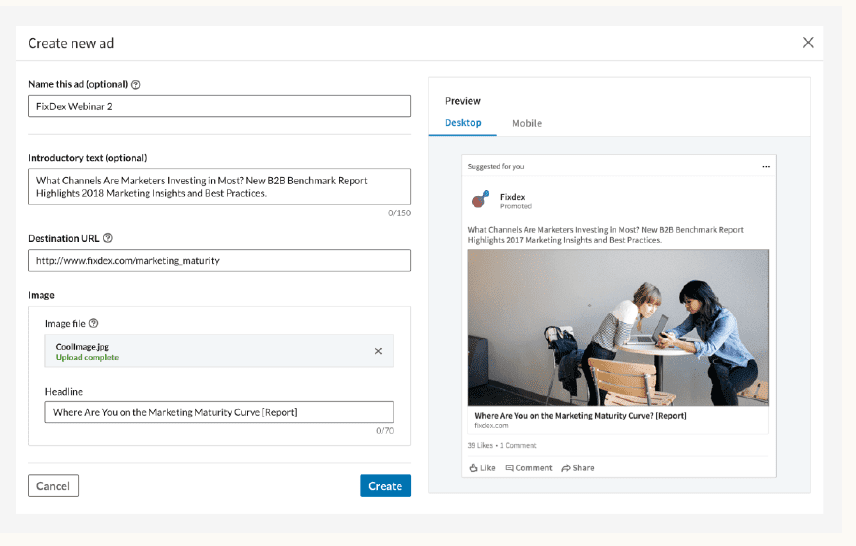
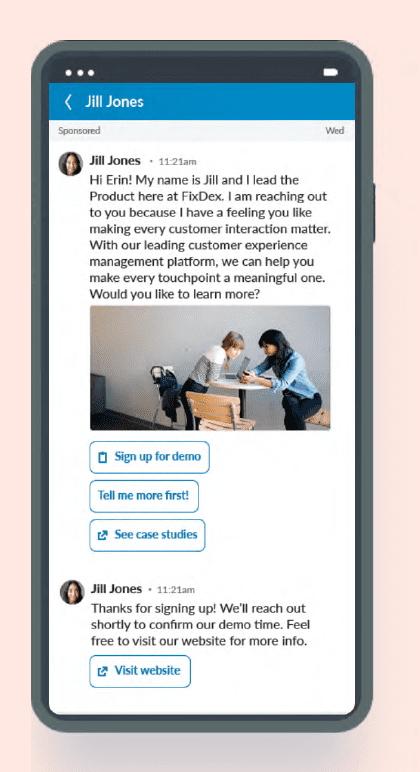
- Try message ads to engage members via the Linkedin inbox.
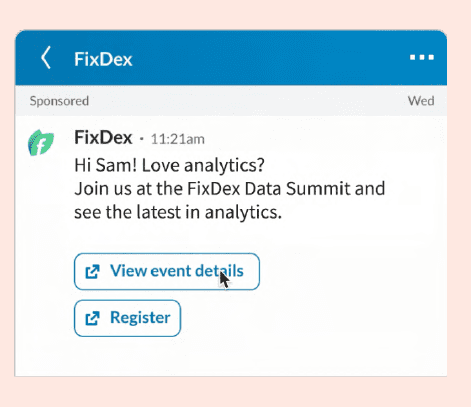
- Leverage dynamic ads to natively reach members with a personalized touch.
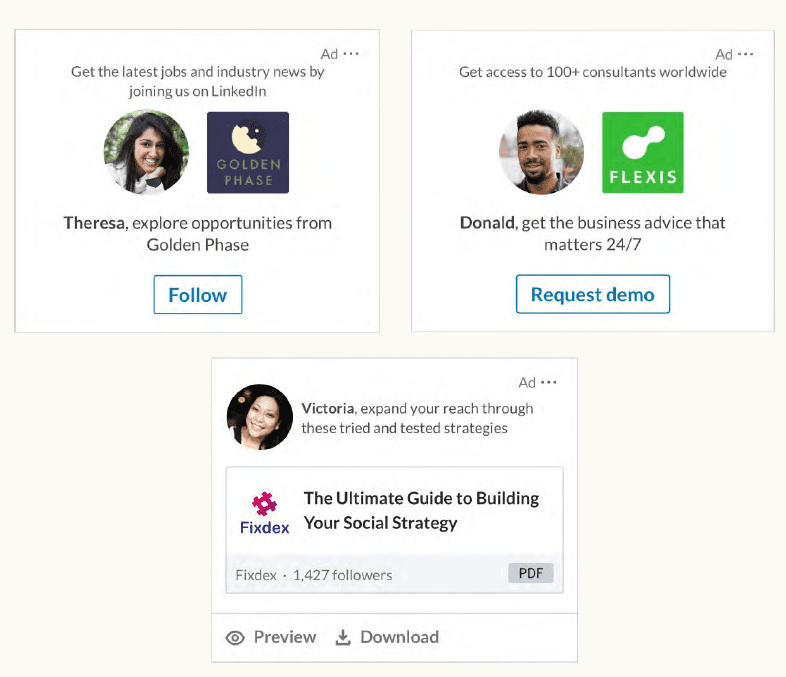
By combining high quality reach with precise targeting, Linkedin enabled you to:
- Engage your target from among the most affluent, influential, and educated audience on social media.
- Increase awareness, credibility, and impact.
- Drive traffic and qualified leads to your site.
The greater your organic reach, the more it can amplify your paid efforts.
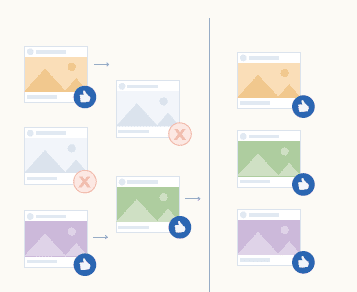
By testing and optimizing with organic content, you ensure you’re investing in your highest performing content for paid campaigns.
Explore more linkedin tools to build campaign:
Drive engagement and reach through:
- Sponsored content, including video and carousel ads.
- Dynamic ads
- Text ads
- Message ads
- Display ads
Optimize and Measure with.
- Contact targeting
- Lead Gen Forms
- Website Retargeting
- Account based marketing
- Linkedin Audience Network
How to Boost from the Linkedin Page?
After you’ve established your linkedin page and are engaging regularly with community.
It’s time to invest in growing your brand and business beyond the borders of your followers.
One simple way to start advertising is to use Boosting to turn organic post into a paid ad quickly.
Boosted posts are billed through your ad accounts in campaign manager, not the Linkedin page.
If you don’t have a campaign manager account, a new one will be created for you when you boost a post.
This makes it easy for you to evolve your ad campaign strategy beyond boosting when you’re ready.
You can boost several types of content : text posts, single images, events and videos.
To create campaigns with other ad formats like Carousel ads or Dynamic ads, Campaign manager is needed.
Using Campaign Manager also unlocks more sophisticated bidding and advanced audience targeting.
Some additional tips on boosting organic content, by a Linkedin Certified Marketing Expert.
- Not all promotional posts need to be paid.
- Boost content strategically to achieve KPIs and Objectives. Post partnerships and product launches.
- Social proof attracts attention : Boost content
- Thought leaders build awareness. Thought leaders in your company can help you amplify reach. (special topics like a thought leader on marketing)
#CertifiedMarketingExpertTips
Planning Advertising Campaign Strategy
Before you build your ad campaign, it’s helpful to have a good idea of the content and creative you’re planning to use to advertise.
You don’t always need to build out custom content for Linkedin.
Start by exploring content that you already have that could be repurposed like organic social posts, blog posts, customer case studies, or white papers.
It is recommended having a mix of brand awareness and conversion campaigns.
For example : B2B businesses might split awareness and conversion 50/50 to start.
While B2C businesses might begin with 60/40.
Perfect mix varies depending on your brand and industry, so be prepared to experiment.
When it comes to preparing for your first ad campaign, start by prepping 4 – 5 different ad creatives.
You don’t need to create net new images for each variant – experiment with changing the text on your headlines, as well, Campaigns with more ad creatives will have the opportunity to reach more people in your target audience.
For insight, into ad formats and specifications, take a look at Linkedin ads guide.
Using media library, you can select up to 5 different images or videos to build 5 single image ads or video ads at one time.
Learn more about multi-ad creation using the media library in our help center.
4 main components that you can consider when building out creative for Linkedin
Imagery : Use distinctive and consistent imagery. It is most critical factor in driving engagement within the newsfeed.
Copy : Be discerning with what words you choose and how many.
Format : Use a variety of formats to keep your audience interest piqued.
Testing : Test, learn, and iterate to find the best performing creative combinations.
Being diligent with these components will result in consistent and recognizable creative that you can replicate across formats.
Imagery and copy should have a cohesive feel that capture the viewer’s attention and tell a story.
Idea: Designing for social means designing for mobile.
80% of sponsored content engagement comes from mobile devices.
Learn more about how to create thumb-stopping creative optimized for the feed in this downloadable ebook.
Creative Tips & Tricks
Creative
Visuals are as important as headlines, Create – scroll stopping moments in the field.
Create distinct brand within your imagery for visual consistency.
Highlight insights to pique curiosity like compelling quotes for immediate value add.
Avoid using stock imagery if possible; leverage real people or unexpected images to drive the higher engagement.
Tips and Tricks
- Don’t hide great insights behind a click – Just be careful to not feature too much.
- Professionals are people too – creativity works!
- Cite credible 3rd parties and individuals when applicable.
- For lead gen forms only request the most pertinent info.
Copy
- Make copy clear, concise and compelling. Articulate why someone should care.
- Introductory text should be under 150 characters to avoid links and other CTAs being truncated, especially in mobile.
- Be specific about what audience should expect to learn from content.
- Leverage hashtags to build communities for organic content
- Call out target audience within the copy and/or visual.
- Ad headline should be 70 chars or less.
- Include landing page URL in introductory text.
Ad specs
- Static image size : Landscape : 1.91:1 ratio
Minimum: 640 x 360 px
Maximum : 7680 x 4320 px - Carousel ad cards should be 1080 pixels with a 1:1 ratio. Max of 10 cards.
- Video ads can be 3 seconds to 30 minutes. 15 seconds or less is the most successful.
Work Smart
Leverage smart content you’re already creating.
Commit to A/B testing to optimize your content performance.
Showcase your brand’s voice in the content you are posting to bolster a human connection.
Mobile friendly
80% of sponsored content clicks come from mobile, so make sure content looks great on small screens.
Ensure landing page is mobile optimized.
Watch for the crop factor!. Use the “preview content” function in campaign manager to ensure image looks as expected on both mobile and desktop.
Watch this video for Creative Design considerations and go deeper into best practices for making high-performing ads in the Creative Design for Linkedin Course.
How to get started with Linkedin Campaign Manager ?
Campaign Manager is Linkedin’s ad management platform where you can create, launch, and evaluate the performance of your Linkedin ad campaigns.
For campaign manager, you need an ad account. To create one, you will need:
- A Linkedin profile.
- Paid media admin access to a Linkedin Page
Linkedin Campaign Manager offers different role options based on what you need access to:
Account Manager : ideal if you will oversee account actions including managing users, creating campaigns, and editing campaigns.
Campaign manager: Ideal if you’re only focused on running campaigns. You won’t be able to manage users.
Creative manager : You can edit and add new creatifves. You won’t be able to create new campaigns.
Viewer : You’ll be able to view campaign data and reports. You will not be able to edit any ads or campaign details like targeting or daily budget.
Billing admin: You will be able to change billing details and will have the same access as an account manager to other features.
Learn more about Linkedin Page admin roles and User roles and permissions in Campaign manager.
3 billing options for ad account
Credit card
Fastest way to go live
No minimums
Monthly invoicing
The minimum spend for monthly invoicing is $3000 USD per month for 2 of the last 12 months.
Must have Linkedin campaign manager account.
Fill out Linkedin Advertising Monthly invoicing request form.
Insertion Order:
You will only be able to create an insertion order if you already have a Linkedin ad representative. Speak to your representative to discuss options.
Billing Best Practices
Linkedin ads billing overview: Linkedin marketing solutions offers 3 types of payment methods.
credit card payment : credit card payment is offered to all customers who are using Campaign Manager to manage and run campaigns. This is the quickest way to go online when you create an ad account online.
How do I add credit card information to my linkedin ad account?
- Sign in to campaign manager.
- Click correct account name.
- Click settings icon next to the account name in the upper right corner of the page and select Billing center from the drop down.
- Click Add credit card.
How do I edit existing billing information?
Click manage credit card next to your payment method on the billing center page.
Click Edit and enter your new billing information.
Click change.
Paying with a credit card has no minimums. Your credit card will be charged as follows.
- Daily if your balance is $100 USD or more: Daily billing is scheduled for the following day if the balance reaches $100 USD or more.
- Weekly if your balance is $20 USD or more. Weekly billing is scheduled for the 7th day from the last payment.
- First of the month for total balances due ($0.01 or higher) All outstanding charges are cleared at the end of each month, independent of previous billing cycles.
For eg: if your last payment was feb 27th, and you spent $50.00 on feb 28th, you’d be charged $50 March 1st.
If account has been placed on hold. Follow these steps to remove the hold status.
Online invoicing
Invoicing allows you to run ads up to a certain dollar limit for 30 days prior to payment.
After 30 days, an invoice is sent and payment is required.
This method of invoicing allows you to have a flexible monthly budget up to your approved monthly spend limit that is specified during the application and credit check process.
How do I qualify for invoicing?
You must spend $3000/month with Linkedin marketing solutions for at least 2 consecutive months during the last year in order to qualify to apply for invoicing.
In your application, you will be able to indicate what you plan to spend monthly.
This info. Will be considered alongside your credit check when deciding on a spend limit.
How to apply for invoicing?
- Fill out the application here
- 1 – 4 day turnaround time once your form has been submitted.
How do I update Ad account invoicing details?
- If you need to update billing info. For your linkedin ad account currently set up with monthly invoicing. Please submit your request here with the following info.
Billing contact name, billing contact email ID, any recent changes to company’s legal name, company address, PO number (if applicable)
Invoicing is available only to a handful of alpha users.
What is an Insertion order?
This is a contractual buy with an agreed upon upfront budget, run dates, and product type.
Any account buying through an insertion order requires a dedicated Linkedin account rep.
Minimum spend of $25K per quarter.
You will only be able to create an insertion order if you already have linkedin ad representative.
For any other account requests or help with online accounts, please contact the marketing solutions support team at: https://www.linkedin.com/help/lms/ask
Knowledge Check
Q 1. How many ads do we recommend you have in rotation?
1 – 2
2 – 3
3 – 4
4 – 5
Q 2. What type of page admin permission is needed to run either a sponsored or direct sponsored campaign on behalf of a company?
Super admin, content admin, curate
Choose an Objective
Every Linkedin ad campaign starts with an objective, the action you want customers to take after seeing your ad.
This can include clicking to your website, downloading a document or filling out a lead gen. Form.
Objective determines how you create your campaign and how Linkedin optimizes it to ensure success.
Selecting the most relevant objective allows for our platform to charge only for meaningful actions.
Linkedin supports full-funnel objectives grouped into 3 areas:
Awareness : Brand Awareness
Outcome : Increase in visibility and share of voice.
Metrics: Impressions and reach
Consideration:
Website visits, engagement, video views,
Outcome: Deeper engagement that builds a relationship
Metrics: website visits, engagement with posts, video views.
Conversions : Lead generation, Talent leads, website conversions, Job applicants.
Outcome: Significant next steps that lead to purchase decisions.
Metrics: Website conversions, lead gen. Forms, talent leads, job applicants.
You will only see talent leads available if you have access to Linkedin Recruiter
Note: Install Linkedin Insight Tag to use conversion tracking.
As you evolve your marketing strategy and start to create more advanced campaigns, it’s important to balance objectives across 3 categories of awareness, consideration and conversions.
Too much focus on awareness ads can keep buyers from taking the next steps with your brand.
Too much focus on conversion ads can lead to an empty pipeline, as fewer buyers are aware of your brand.
Idea : To learn more about balancing your strategy, set aside some time to complete a full-funnel content marketing course.
How to Choose the Right Audience?
Linkedin has targeting solutions that make building an effective ad campaign simple and efficient.
With Linkedin, you can target influential audiences from executives and decision makers to individual contributors.
You can effectively run full-funnel marketing campaigns to your entire buying committee.
Linkedin’s targeting is differentiated because members are incentivized to keep their profiles accurate and up-to-date for networking, personal branding and job opportunities.
You can target members using profile-based demographic information, retarget website visitors, or even upload lists of contacts or target companies for account-based marketing.
You can also provide a list of exclusions; companies or individuals you do not want to advertise to for more fine-tuned targeting.
Some targeting attributes like age and gender are inferred based on a member’s profile data.
While we have demographics and interest targeting options, it’s best to create a clear persona and translate that into a professional profile.
Idea : Reverse engineer target audience.
Find a few individuals who match your ideal buyer persona.
Then, evaluate their profiles for demographic trends, like shared job function, title or skills.
Audience sizing
While selecting audience size, you can estimate audience count through the forecasted results feature within the campaign manager.
Keep in mind that there’s no one size fits all approach, as your forecast will vary depending on the objective selected and markets you are engaging with.
The ideal audience size will depend on the region and location you are targeting, as well as your campaign’s objective.
If you are getting started, we suggest having an audience between 30,000+ (niche) to 300K+ (healthy size) members.
We recommend starting with a broad, larger sized audience.
3 Types of matched audience targeting
Email contact targeting: Bring email lists into campaign manager to target specific individuals.
Retargeting : Re-engage website visitors and members who interacted with your ads on Linkedin. Learn more about retargeting.
Account targeting : Generate a list of accounts that are important to your business and target them through Linkedin.
Targeting best practices
1, Align audience to target personas – Align audience to buyer personas.
Focus, personalize, and aim for high relevance.
Do not lump all your buyer personas into one campaign.
You’re likely to see higher performance if you break out campaigns by different personas.
Consider all potential members of your buying committee.
2. Split campaigns by region – If you’re targeting multiple geographical areas, try breaking down campaigns by region to ensure the budget is split evenly.
If audience size is still too small, consider adding multiple regions to one campaign.
3. Start broad with your targeting – Start broad, then narrow down the audience according to insights obtained from campaign demographics or Audience insights.
Select at least 2 targeting options in addition to language and location facets.
We recommend company size, industry, job title, job seniority, job function, skills or matched audiences.
4. Avoid inferred attributes – Avoid using age, gender, and profile location as these are inferred and could potentially reduce audience size by 50% or more.
If you’re looking to target by age, for instance, try using years of exp. Or job seniority instead.
5. Tailor content to your segments.
Tailor content to be more relevant for each segment, then test to see which performs best.
Keep testing.
You can test similar campaigns with variations in targeting to see which are more effective.
You can create a campaign, duplicate it, then alter your targeting.
Idea: study up on Linkedin’s targeting options and best practices in – Using Linkedin’s ad targeting course.
Also check out Targeting best practices help center article.
How to Choose an Ad Format for Linkedin Ads ?
Once you have chosen your objective and audience, you can choose ad formats and begin adapting creative to suit each one.
Campaign manager will recommend ad formats that best match your objective.
Be thoughtful and use the in-tool descriptions and tips to be sure you select the best ad format as this cannot be changed after the campaign is saved.
Use the following table and linkedin ads guide as reference for ad formats.
Single image ad : allow you to promote your message directly in the Linkedin feed.
This ad format can be targeted to specific audiences across desktop and mobile.
Single image ad specs. [reference]
Carousel Ad : Carousel ads allow you to tell an interactive story with series of swipeable cards in the Linkedin feed.
You can customize the content and link for each card.
Video Ad : Video ads allow you to engage your audience with interactive content directly in their feed.
These ads show up on desktop and mobile.
Event Ad : allow you to promote Linkedin events from your page to a defined audience.
As a sponsored content ad format, event ads are displayed in a member’s linkedin feed on desktop and mobile devices
It is optimized to highlight important event details.
Document ad : allow you to promote both gated and ungated documents like papers, slides or ebooks directly to professionals in the linkedin feed.
They let members read directly on linkedin with comfort and speed. Both in mobile and desktop views.
Thought Leader ad : allow you to sponsor yout thought leaders’ posts, helping you to authentically communicate through a trusted voice to build brand equity and stay top-of-mind when your target audience is ready to buy.
So, in short, thought leader ads are their to build brand equity.
Text ad : Text ads consist of a headline, brief text, and an optional image.
This format is placed on the right rail on desktop.
Text ads are desktop-only ads.
So, in short, you only see text ads on desktop and not your mobile phones.
Dynamic ads are personalized ads that appear on the right rail of desktop pages and allow you to acquire followers, showcase your product and share thought leadership.
Dynamic ads are desktop-only ads.
Note: Text ads and dynamic ads are desktop-only ads.
Message ad
Message ads are direct personalized messages delivered through Linkedin messenger with a single call-to-action.
Messages are only delivered when members are active on Linkedin to ensure higher conversion.
This format is available on desktop and mobile.
Conversation ad : Conversation ads allow you to create a choose-your-own-path experience for your audience.
This allows for deeper engagement with your audience and more conversions.
This format includes multiple call-to-action buttons which is quite interesting and unique to it.
How to Set Budget, Schedule and the Bid for Linkedin Ads ?
When you launch a campaign on Linkedin, what you’re charged for is determined by your campaign’s optimization goal and bidding strategy, while the cost of your ads is determined by the ad auction.
Linkedin’s dynamic pricing model, powered by AI, is built to help advertisers get the most out of every dollar you spend.
Instead of one-size-fits-all approach, Linkedin tailors pricing to match goals, budget and ROI needs.
This flexible system means an advertiser can compete more effectively in the auction and maximize his campaign performance.
3 factors affect Linkedin’s campaign spend.
- Budget
- Schedule
- BIdding
Budget : Campaign Manager gives control to an advertiser over his ad campaign budgets by providing several budget options.
Option 1 is spend distribution : Lifetime pacing: All budget options use lifetime pacing, which manages how budget is spent throughout the duration of campaign.
Lifetime pacing predicts platform activity over the course of the campaign and optimizes budget distribution and spend based on the campaign objective, ad format and optimization goal.
Option 2 is Spend amount : Budget Options
At the campaign leve, an advertiser can turn dynamic campaign budget to optimize budget across the entire campaign, rather than for a specifc ad set.
If you select dynamic campaign budget, you can choose either daily budget or lifetime budget but not both.
Campaign Level
Dynamic Campaign Budget automatically and continuously finds optional auction opportunities for the entire campaign.
At ad set level, daily budget allows you to set the average amount you’d like to spend per day for the ad set.
At ad set level, Lifetime budget allows you to set the total amount that you’ll spend for the entirety of the ad set’s schedule from start date to end date.
At the ad set level, daily and lifetime budgets allow you to set both an average daily budget and total lifetime spend to guide daily pacing while maximizing impression opportunities within your overall ad set.
Set your schedule
Determine how long you want to run your ads.
Depending on the budget option you choose, you’ll select from the following scheduling options:
Run campaign continuously
Start a start and end date
If you need to manually set the ad campaign’s dates, it is recommended to set it to a minimum of 7 days.
Linkedin ads run based on UTC (Universal TIme Coordinated) so if you pick a date for “tomorrow” at 6 pm, your campaign will run based on the UTC time zone.
To learn more about setting an ad campaign schedule, you can do so by visiting “campaign schedules“ help center page on Linkedin.
Set the Bid
When an advertiser advertises on the platform, ad ad auction determins which ads the professionals on the platform will see and how much the advertiser will pay.
A bid represents the amount that an advertiser is willing to pay for a Linkedin’s member’s action.
The type of action that a campaign is optimized for will be based on your goals, which is a combination of the objective and bid type.
In Linkedin Campaign Manager, there are 3 bid types : Maximum delivery, cost cap and manual
Maximum Delivery
Get the most results possible with the full budget.
Use ML (machine learning) to optimize the entire budget based on the objective selected.
Cost cap
Set a maximum average cost per key result.
The system aims to keep costs under this amount by prioritizing lower-cost opportunities in the auction.
This is an ideal selection for advertisers who want cost control especially for leads.
Manual.
Exercise the most control over the bid. This may limit the performance thought.
The bid amount should be defined by how much a campaign result (click, impression or conversion) is worth to the business.
To be honest with you, winning the auction is not just about having the highest bid in Linkedin ads.
Their AI-powered system is designed to deliver the most value for both advertisers and members.
The winning ad is the one that creates the best experience for the member while helping maximize the return on investment (ROI)
To determine, the ad that’s delivered, Linkedin considers both bid amount and the ad’s relevancy to the member.
If you have experience with meta ads then you will realize linkedin ads and meta ads are very similar to each other.
Infact all 3 platforms i.e. google, linkedin and meta, they use AI and use relevancy score for the ads to be displayed to their platform members.
3 Budget and Bidding best practices that you should be aware of
- Calibrate budget
- Enable dynamic campaign budget to manage budget across a campaign.
- Avoid setting budgets too low, as it prvents learning and limits delivery.
- Increase budget if the campaign is spending more than 85% of the daily budget and you’re satisfied with the performance. This indicates that there is room for scaling.
- Optimize bidding
- Use automated bidding. Start with maximum delivery or cost cap to let the system optimize.
- Cost cap bidding : Raise the cost cap slowly to improve delivery while maintaining control.
- Start on the high end of the suggested range. Reduce bid slowly to lower costs without hurting performance.
- Monitor performance about 10 to 14 days after the campaign starts. Adjust the bid to improve results.
- Expand reach
- Ensure audience size is large enough before increasing the budget.
- Use LAN (Linkedin audience network) to extend reach
- Enable audience expansion if needed to find similar members.
- Use at least 5 different ad creatives in each campaign to avoid frequency limits that can reduce the reach.
Idea: Make sure to check auction tips to optimize on Linkedin, as well as bidding best practices.
How to create the Linkedin ads?
Once all campaign parameters are set above, it’s time to build the linkedin ads.
- Collect the ad content first.
- It maybe an image, video, document or an existing page post.
- You may have content to repurpose from another source.
- You may want to create something unique for Linkedin.
- Upload new multimedia.
- Upload up to 5 images or videos at a time directly from the files to the media library.
- The media library will store up to 1000 images or videos from the past 12 months of direct sponsored content in the account.
- Fill the details
- Draft compelling and conversational introductory text with the help of any AI tool let us say chatgpt or google gemini.
- Write a concise and descriptive headline.
- Add a URL and select a logical call-to-action (CTA)
- Preview the ad(s)
- Linkedin campaign manager allows you to see what your ad(s) will look like on desktop, mobile and, if selected in Audience network (LAN) placements using the ad preview tool.
- Make sure everything looks as expected before selecting Create.
Linkedin’s algorithm will optimize the delivery of the content that performs best.
It is recommended launching with 4 – 5 ad creatives, then monitoring content faitgue and swapping out underperforming ads with new content once a month or once you have reached enough impressions to optimize against.
New ads do not always mean new content.
Use different copy and images to experiment and find the most effective variations.
Remember to test the ad in the preview tool to make sure the image(s) aren’t being cropped on mobile devices.
How to Launch and Optimize the Linkedin Ads?
The last step before launching an ad campaign is setting the start and end dates.
After launching the first ad campaign, Linkedin recommends letting it run for at least 7 consecutive days before making any optimizations.
I would recommend using a pen and paper if you have a habit of getting ideas while running the campaign. Just gather all the ideas and then optimize in go giving linkedin algorithms enough time to optimize over them.
It is all about gathering performance data.
Linkedin Ad Review
To provide a good experience for its members, Linkedin reviews, all new ads and major changes made to existing ads before they go live.
The review is conducted according to Linkedin’s advertising guidelines.
Most reviews are completed with 24 hours, but during period of high review volume, the process may take longer.
Review status can be checked for the ads by looking at the status column in the campaign manager.
If the ad is rejected, most ad types can be edited and submitted again for review.
Direct Sponsored Content ads and Text ads can be edited directly in the Linkedin’s Campaign manager.
When you save your changes, the ad is automatically resubmitted for review.
Sponsored Linkedin Page Posts cannot be edited directly because they are linked to updates published on the Linkedin Page.
If such an ad is rejected, you must :
Turn off the promotion for the affected post.
Create a new post that follows Linkedin’s advertising guidelines.
Sponsor the new post.
Review and optimize
After your campaign goes live, you can monitor its performance using the reporting tools available in campaign manager.
Successful advertisers typically review their campaigns every week to:
- Check bid ranges.
- Ensure the daily budget is beign allocated properly.
- Review other important performance factors.
Once your campaign has been running for at least 7 consecutive days, you can use Campaign Manager reports and Linkedin’s built-in recommendations to optimize campaign performance.
Note : Campaign Optimization Tactics explains how to improve campaign results further.
Let’s check your knowledge now.
- Which of these is not a step in creating a Linkedin ad campaign?
- Choose your objective
- Select targeting criteria
- Conduct SEO research
- Set budget and schedule
- What marketing objectives can you meet with Linkedin Ads?
- Drive awareness
- Increase consideration
- Upsell purchases
- Drive conversions
- Increase brand engagement
- Reward customer loyalty
- What targeting options do we recommend testing instead of age?
- Hobbies
- Years of Experience
- Favorite bands
- Job Seniority
- Linkedin ads run based on what time zone?
- UTC
- PSF
- ESF
- GMT
- Which 2 factors determine the ad that’s delivered through Linkedin Campaign Manager?
- Ad relevance
- Bid
- Pricing
- Campaign Types
- What is the recommended bidding strategy for advertisers who want the convenience of automated bidding with cost control?
- Cost cap
- Manual
- Maximum Delivery
Feedback : Cost cap bidding places competitive bids while staying below your desingated maximum average per key result.
- True or False : The Linkein auction prioritizes the interests of the members over the interests of the advertiser.
- True
- False
Campaign Manager Reporting
After launching the ad campaign, the next job is to regularly monitor and measure performance so you can improve the results over time.
Campaign manager makes it easy to track and analyze how the campaigns are performing.
Campaign manager reporting is the main area where campaign performance can be viewed.
In the advertise section of campaign manager, you will see a list of all your campaigns.
From there, you can view results at 3 levels.
Campaign groups.
Campaigns
Ads
Choose the metrics that match your campaign objective.
For example: If your goal is brand awareness, focus on metrics like impressions (how many times your ad was shown), CPM (Cost per mille) i.e. the cost for every 1,000 impressions.
If your goal is lead generation, focus on number of leads, cost per conversion, converion rate (to understand which adverts are most effective in driving desired actions).
Campaign Manager offers many metrics and reporting views.
If you’re not sure what a metric means, simply click the metric name in the report header to see its definition, making it easier to understand and interpret the results.
For example: Impressions – The number of times people were shown your ad.
Visualizing Campaign Data
Campaign manager also gives tools to visualize and analyze your ads performance data.
To view performance charts:
- Select the checkboxes next to campaigns you want to analyze.
- Click Performance chart to visualize campaign performance over time.
- Click Demogrphics to see who is engaging with the ads.
- Use export to download reports if you want to combine campaign manager data with your own data reporting systems.
For example, a Performance chart can display clicks across multiple campaigns over a selected time period.
Benchmarking your results
Benchmarking is a useful way to evaluate campaign performance.
After running several campaigns:
- Compare campaigns using campaign manager reporting tools.
- Review average costs and average engagement levels.
- Establish a performance baseline.
- Identify campaigns that significantly outperform or underperform the average.
- Use the insights to optimize future campaign strategies.
For more detailed guidance and best practices, refer to Linkedin’s Reporting and Analytics course.
Additional Reporting Tools
For deeper campaign reporting and measurement, you need to install the Linkedin Insight tag on all the pages of the website.
Once the tag is installed, you gain access to:
- Conversion tracking.
- Tracks website conversions that result from the Linkedin ads.
- Help Linkedin automatically optimize for more conversions.
- Site retargeting.
- Allows you to build retargeting audiences based on website visitors.
- Lets you retarget visitors from any page of the website.
- Advanced Demographics
- It provides 1st-party audience insights.
- It helps you understand who is engaging with your brand.
- Can reveal details like company size and other professional attirbutes.
Supported Tag Management Systems
The Linkedin Insight Tag works with several popular tag management platforms like:
So, setting up the Linkedin Insight Tag and Conversion Tracking is usually a very simple one-time setup.
Once implemented, it provides more advanced reporting, richer audience insights, conversion measurement and better visibility into your advertising performance.
If you need help getting started, Linkedin recommends reviewing its conversion tracking course.
Time please for the Knowledge check
- Which capabilities can you access with the Linkedin Insight Tag?
Conversion Tracking
Site Retargeting
Advanced Demographics
All of the above
2. Where on Linkedin would you go to look for the ad campaigns’ reporting and analytics?
Linkedin Home Page
Linkedin Campaign Manager
Linkedin page
To Conclude the introduction to Linkedin Ads
Linkedin Ad Campaign Creation – Complete Recap
You are now ready to create and launch a linkedin ad campaign using the Linkedin Campaign Manager.
There are basically 5 key steps to launching a successful campaign.
- Choose your objective : start by selecting a campaign objective – the specific action you want people to take after seeing your ad.
- Your objective should align with your most important short-term business goal.
- Over a period of time, it is best to run campaigns across different stages of the marketing funnel (Awareness, Consideration and Conversion)
- Select Your Target Audience.
- Define your ideal customer personas and choose targeting criteria accordingly.
- Begin with broader targeting.
- Gradually refine your audience based on campaign performance and optimization insights.
- The ideal audience size depends on:
- Geographic location.
- Target market.
- Campaign Objective.
- Choose an Ad format and Add Creative.
- Linkedin Campaign Manager recommends ad formats based on your selected objective.
- Select the format that best supports your goal.
- Upload compelling creative assets that are relevant to your target audience.
- Set budget and schedule.
- Configure your campaign budget and run dates.
- Linkedin recommends using maximum delivery (automated bidding) to maximize within your budget.
- This allows the system to automatically optimize bids and spend your budget efficiently.
- Configure your campaign budget and run dates.
- Add multiple creatives and launch.
- Before launching:
- Include 4 – 5 different ad creatives in the campaign.
- Test variations of:
- Headlines
- Images of videos.
- Ad copy.
- Call-to-action (CTAs)
- Before launching:
This helps identify which creative performs best.
After launch.
Once the Linkedin campaign goes live:
Allow it to run for atleast 7 days before making any major changes.
Review key performance metrics after the first week.
Identify top performing ads and audiences.
Optimize based on actual campaign data rather than early results.
So here is the key principle to keep in mind.
Launch - Wait for 7 days - Analyze Performance - Optimize - Scale what works.